Inventory federation
Overview
Beamable supports custom inventory federation using managed microservices. You can use this service to extend the Inventory system with items that are managed externally, such as off-chain inventory records, platform-owned assets, or NFT-backed items.
Some use cases:
- Blockchain assets - use NFTs as inventory items and auto-mint new items
- Generative AI - grant players AI-generated items
Requirements:
- Federated Inventory depends on the implementation of Federated Identity, that means that every player first needs to have a federated identity with the same microservice that federates inventory
- Inventory items are content-driven. To enable federation, content items must be marked as federated to a specific microservice
The diagrams below illustrate the flows for retrieving and granting the Inventory Items with Federation enabled
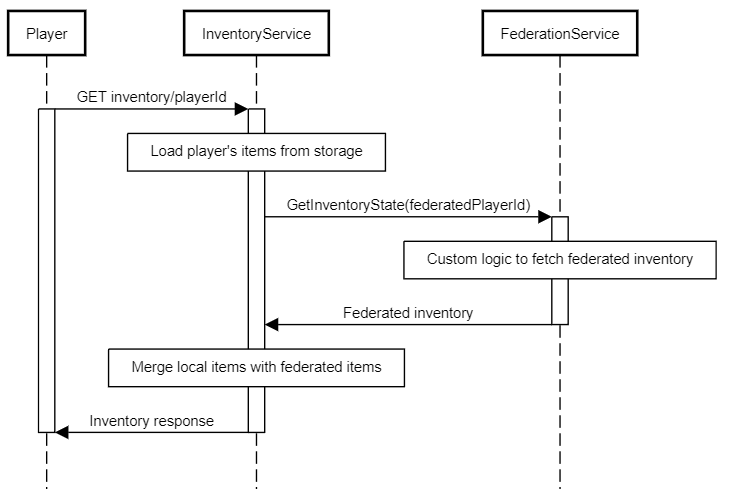
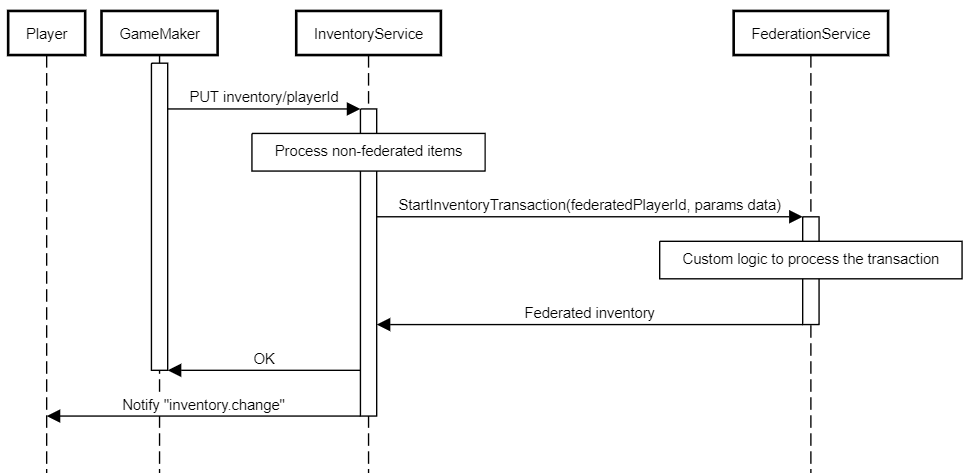
IFederatedInventory<T> interface
To use the Federated Inventory you should start by implementing the IFederatedInventory<T> interface in your microservice.
Note that this interface also implements IFederatedLogin<T> because federated authentication is a prerequisite.
T must be your implementation of the IThirdPartyCloudIdentity - a basic interface that
requires you to define a unique name/namespace for your federation. This enables you to have multiple federation
implementations in a single microservice.
public class MyFederationIdentity : IThirdPartyCloudIdentity
{
    public string UniqueName => "my-cool-federation";
}

[Microservice("MyFederation")]
public class MyFederationService : Microservice, IFederatedInventory<MyFederationIdentity>
{

}
GetInventoryState implementation
You can perform any custom logic here. For example, you could AI generate some items, load items from a smart contract, use microstorage, or perform anything that satisfies your specific requirements. Here is a dummy example that will return some static items and currency, just to showcase the response structure:
public Promise<FederatedInventoryProxyState> GetInventoryState(string id)
{
    return Promise<FederatedInventoryProxyState>.Successful(
        new FederatedInventoryProxyState
        {
            currencies = new Dictionary<string, long>
            {
                { "currency.federated-gold", 1000 },
                { "currency.federated-silver", 5000 }
            },
            items = new Dictionary<string, List<FederatedItemProxy>>
            {
                {
                    "items.avatar", new List<FederatedItemProxy>
                    {
                        new()
                        {
                            proxyId = "externalAvatarId1",
                            properties = new List<ItemProperty>
                            {
                                new() { name = "level", value = "20" },
                                new() { name = "color", value = "blue" }
                            }
                        },
                        new()
                        {
                            proxyId = "externalAvatarId2",
                            properties = new List<ItemProperty>
                            {
                                new() { name = "level", value = "30" },
                                new() { name = "color", value = "red" }
                            }
                        }
                    }
                }
            }
        }
    );
}
The important thing to emphasize here is the id argument. It is the same external account id that you return from the
Authenticate method. If you want to access the player's id in the Beamable system, you can use this.Context.UserId
As an example, you can use the wallet address as an external user identifier when implementing blockchain federation.
StartInventoryTransaction implementation
The Inventory service will forward all the changes against federated currency and items. This method has the same return type as the previous one.
public async Promise<FederatedInventoryProxyState> StartInventoryTransaction(string id, string transaction, Dictionary<string, long>
        currencies, List<FederatedItemCreateRequest> newItems, List<FederatedItemDeleteRequest> deleteItems, List<FederatedItemUpdateRequest> updateItems)
{
    await _myFederation.ApplyCurrency(currencies);
    await _myFederation.AddItems(newItems);
    await _myFederation.UpdateItems(updateItems);
    await _myFederation.DeleteItems(deleteItems);
    return await GetInventoryState(id);
}
The transaction argument is a unique transaction id generated in the Beamable Inventory service, and you can use it to guard against multiple submissions.
This synchronous approach is the default path: apply the change to the external system before StartInventoryTransaction
returns, then return the new proxy state.
If transaction processing is too slow to return a timely response, use an asynchronous approach. In that case,
StartInventoryTransaction still returns a FederatedInventoryProxyState; there is no special "pending" value that
tells Beamable to wait for a later callback. Return the current proxy state immediately, process the transaction in the
background, and then notify Beamable after the external system commits the change.
Use proxy/reload after the external commit when GetInventoryState can read the updated state from the external
system. Beamable calls back into your federation and refreshes its cached proxy inventory from the returned state.
await Requester.Request<CommonResponse>(
    Method.PUT,
    $"/object/inventory/{_userContext.UserId}/proxy/reload");
Use proxy/state when you already have a complete snapshot and want to replace Beamable's cached proxy inventory
directly. The payload has the same shape as FederatedInventoryProxyState.
var newState = new FederatedInventoryProxyState
{
    currencies = new Dictionary<string, long>
    {
        { "currency.federated-gold", 1250 }
    },
    items = new Dictionary<string, List<FederatedItemProxy>>
    {
        {
            "items.avatar", new List<FederatedItemProxy>
            {
                new()
                {
                    proxyId = "externalAvatarId1",
                    properties = new List<ItemProperty>
                    {
                        new() { name = "level", value = "31" },
                        new() { name = "color", value = "blue" }
                    }
                }
            }
        }
    }
};

await Requester.Request<CommonResponse>(
    Method.PUT,
    $"/object/inventory/{_userContext.UserId}/proxy/state",
    newState);
Keep each callback scoped to one inventory federation. If one gameplay result touches assets owned by multiple external systems, send one callback per federation.