Beamable Boss Battle - Microservices sample
In the "Beamable Boss Battle" (BBB) sample game, The Hero has reached the dungeon. Battle the Boss to win.
Related Features
• Microservices - Server-side code that runs in the cloud to handle game logic, data validation, and real-time multiplayer functionality
Screenshots
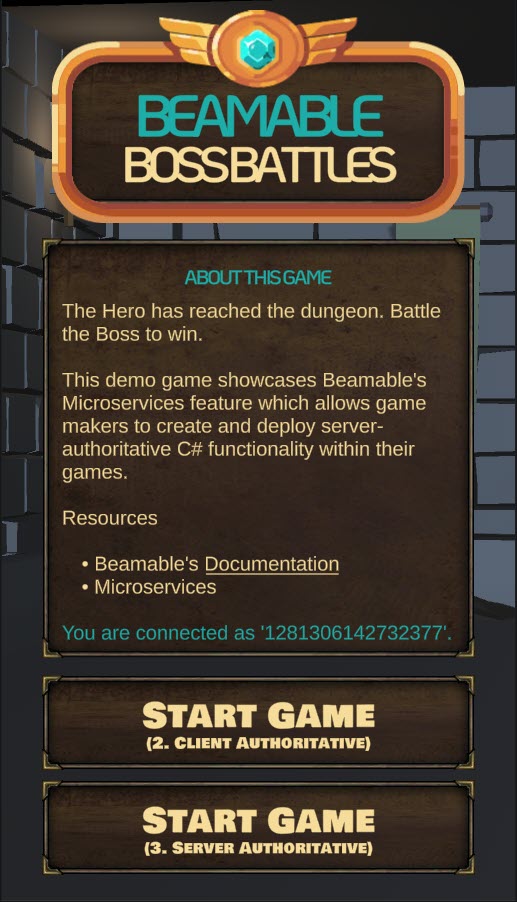
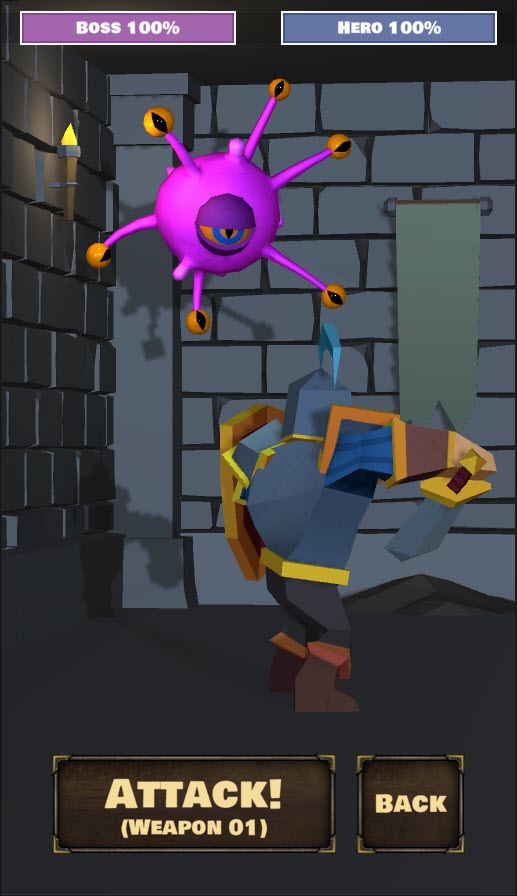
The player navigates from the Intro Scene to the Game Scene, where all the action takes place.
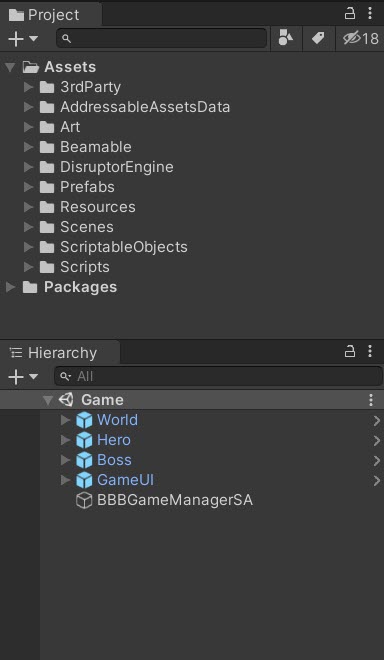
| Intro Scene | Game Scene | Project |
|---|---|---|
 |
 |
 |
Microservices (BBB) - guide
This document and the sample project allow game makers to understand and apply the benefits of Microservices in game development. Or watch this video:
Download
Learning Resources:
| Source | Detail |
|---|---|
 |
1. Download the Microservices BBB Sample Project 2. Open in Unity Editor (Version 2021.3 or later) 3. Open the Beamable Toolbox 4. Sign-In / Register To Beamable. See Installing Beamable for more info 5. Complete the Docker setup. See Microservices for more info 6. Click to "Start" the server. See Microservices for more info 7. Publish the Beamable Content to your realm. See Content Manager for more info 8. Open the 1.Intro Scene9. Play The Scene: Unity → Edit → Play Note: Sample projects are compatible with the latest supported Unity versions |
Player experience flowchart
The player experience flowchart shows the game flow:
The player battles the boss and the workload is appropriately divided between the C# game client code and the C# Beamable Microservice code. Goals of using server-authoritative programming include to increase the game's security (against any malicious hackers in the game's community) and to improve live ops workflows.
- StartTheBattle () - Public Microservice method to reset the
BossHealthStat and randomizeHeroWeaponIndexStat - AttackTheBoss () - Public Microservice method to reduce the
BossHealthStat based onWeaponContent
Game Maker user experience
The game maker user experience shows the development workflow. There are 3 major parts to this game creation process.
Steps
Here are the steps to implement the sample:
Related Features
Related Features:
• Microservices - Server-side code that runs in the cloud to handle game logic, data validation, and real-time multiplayer functionality
Step 1. setup Beamable content
This is a general overview of Beamable's Content flow. For more detailed instructions, see the Content Manager doc.
| Step | Detail |
|---|---|
| 1. Setup Beamable Microservices | • See Getting Started With Beamable Microservices |
2. Create Weapon content class |
[ContentType("weapon")]public class Weapon : ContentObject{public float HitChance = 0.5f;public int MinDamage = 25;public int MaxDamage = 50;} |
| 3. Create the "Weapon" content | 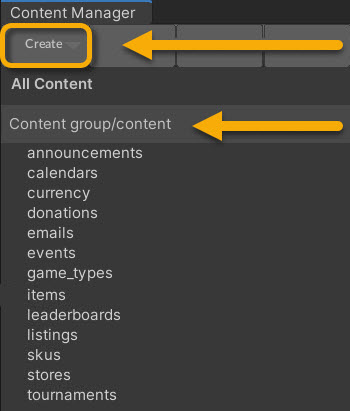 • Select the content type in the list • Press the "Create" button • Populate the content name |
| 4. Populate all data fields | 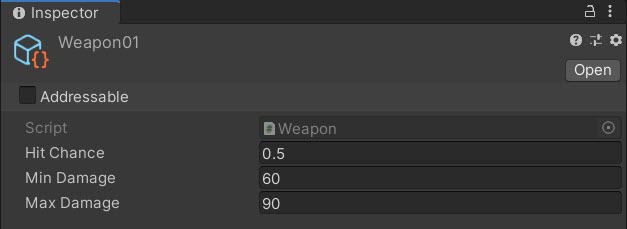 |
5. Create Boss content class |
[ContentType("boss")]public class Boss : ContentObject{public int MaxHealth = 100;} |
| 6. Create "Boss" content | • Select the content type in the list • Press the "Create" button • Populate the content name |
| 7. Populate all data fields | 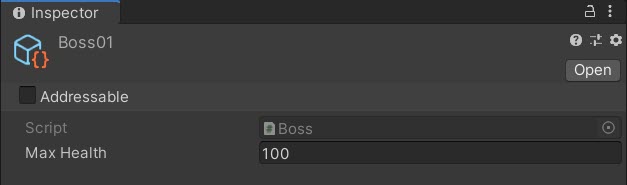 |
| 8. Save the Unity Project | • Unity → File → Save Project Best Practice: If you are working on a team, commit to version control in this step. |
| 9. Publish the content | • Press the "Publish" button in the Content Manager Window. See Content Manager for more info. |
Step 2. create game client code
This step includes the bulk of time and effort the project.
| Step | Detail |
|---|---|
| 1. Create C# Client Code (Basics) | • The details vary wildly depending on the needs of the project's game design. |
| 2. Create C# Client Code (To Call Microservices) | • See BBBGameManagerSA.cs below. |
Inspector
Here is the BBBGameManagerSA.cs main entry point for the Game Scene interactivity. The "SA" in the class name indicates server-authoritative.
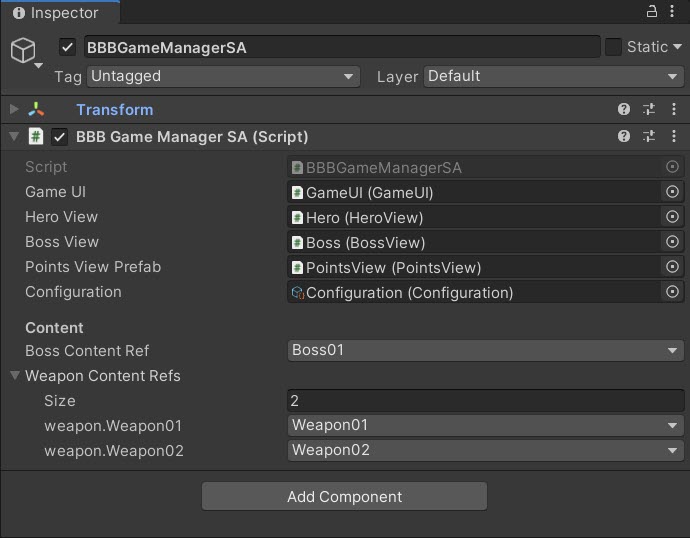 The "Content" references are easily configurable
Here is the Configuration.cs holding high-level, easily-configurable values used by various areas on the game code.
Gotchas
Here are some common issues and solutions:
• While the name is similar, this Configuration.cs is wholly unrelated to Beamable's Configuration Manager.
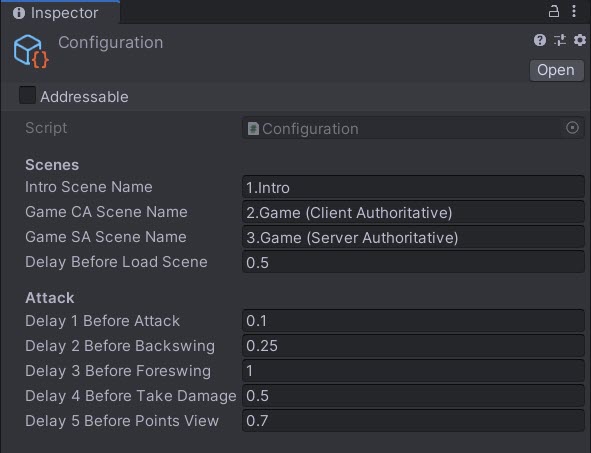 The "Configuration" values are easily configurable
Optional: Game Makers may experiment with new Delay values in the Attack section and allow the player's turn to occur faster or slower.
Code
BBBGameManagerSA.cs
namespace Beamable.Samples.BBB
{
   public class BBBGameManagerSA : MonoBehaviour
   {
      //  Fields ---------------------------------------

      [SerializeField]
      private GameUI _gameUI = null;

      [SerializeField]
      private HeroView _heroView = null;

      [SerializeField]
      private BossView _bossView = null;

      [SerializeField]
      private PointsView _pointsViewPrefab = null;

      [SerializeField]
      private Configuration _configuration = null;

      [Header("Content")]
      [SerializeField]
      private BossContentRef _bossContentRef = null;

      [SerializeField]
      private List<WeaponContentRef> _weaponContentRefs = null;

      private PointsView _pointsViewInstance = null;
      private BBBGameMicroserviceClient _bbbGameMicroserviceClient = null;

      //  Unity Methods   ------------------------------
      protected void Start()
      {
         _gameUI.AttackButton.onClick.AddListener(AttackButton_OnClicked);

         // Block user interaction
         _gameUI.CanvasGroup.DOFade(0, 0);
         _gameUI.AttackButton.interactable = false;

         _bbbGameMicroserviceClient = new BBBGameMicroserviceClient();
         StartTheBattle();

      }

      //  Other Methods --------------------------------
      private void StartTheBattle ()
      {
         int heroWeaponIndexMax = _weaponContentRefs.Count;

         // ----------------------------
         // Call Microservice Method #1
         // ----------------------------
         _bbbGameMicroserviceClient.StartTheBattle(_bossContentRef, heroWeaponIndexMax)
            .Then((StartTheBattleResults results) =>
            {
               _gameUI.BossHealthBarView.Health = results.BossHealthRemaining;
               _gameUI.AttackButtonText.text = BBBHelper.GetAttackButtonText(results.HeroWeaponIndex);

               // Find the Weapon data from the Weapon content
               _weaponContentRefs[results.HeroWeaponIndex].Resolve()
                  .Then(content =>
                  {
                     //TODO; Fix fade in of models (Both scenes)
                     BBBHelper.RenderersDoFade(_bossView.Renderers, 0, 1, 0, 3);
                     BBBHelper.RenderersDoFade(_heroView.Renderers, 0, 1, 1, 3);

                     // Allow user interaction
                     _gameUI.AttackButton.interactable = true;
                     _gameUI.CanvasGroup.DOFade(1, 1).SetDelay(0.50f);

                  })
                  .Error((Exception exception) =>
                  {
                     System.Console.WriteLine("_bossContentRef.Resove() error: " + exception.Message);
                  });

            })
            .Error((Exception exception) =>
            {
               UnityEngine.Debug.Log($"StartTheBattle() error:{exception.Message}");
            });
      }


      private IEnumerator Attack()
      {
         _gameUI.AttackButton.interactable = false;

         // Wait - Click
         yield return new WaitForSeconds(_configuration.Delay1BeforeAttack);
         SoundManager.Instance.PlayAudioClip(SoundConstants.Click02);

         // Wait - Backswing
         yield return new WaitForSeconds(_configuration.Delay2BeforeBackswing);
         SoundManager.Instance.PlayAudioClip(SoundConstants.Unsheath01);
         _heroView.PrepareAttack();

         bool isDone = false;

         // ----------------------------
         // Call Microservice Method #2
         // ----------------------------
         AttackTheBossResults attackTheBossResults = null;
         _bbbGameMicroserviceClient.AttackTheBoss(_weaponContentRefs)
            .Then((AttackTheBossResults results) =>
            {
               isDone = true;
               attackTheBossResults = results;

            })
               .Error((Exception exception) =>
            {
               UnityEngine.Debug.Log($"AttackTheBoss() error:{exception.Message}");
            });

         while (!isDone)
         {
            yield return new WaitForEndOfFrame();
         }

         // Wait - Swing
         yield return new WaitForSeconds(_configuration.Delay3BeforeForeswing);
         SoundManager.Instance.PlayAudioClip(SoundConstants.Swing01);
         _heroView.Attack();

         // Show floating text, "-35" or "Missed!"
         if (_pointsViewInstance != null)
         {
            Destroy(_pointsViewInstance.gameObject);
         }
         _pointsViewInstance = Instantiate<PointsView>(_pointsViewPrefab);
         _pointsViewInstance.transform.position = _bossView.PointsViewTarget.transform.position;

         // Evaluate damage
         if (attackTheBossResults.DamageAmount > 0)
         {
            // Wait - Damage
            yield return new WaitForSeconds(_configuration.Delay4BeforeTakeDamage);
            SoundManager.Instance.PlayAudioClip(SoundConstants.TakeDamage01);
            BBBHelper.RenderersDoColorFlicker(_bossView.Renderers, Color.red, 0.1f);
            _bossView.TakeDamage();

            // Wait - Points
            yield return new WaitForSeconds(_configuration.Delay5BeforePointsView);
            SoundManager.Instance.PlayAudioClip(SoundConstants.Coin01);

            _pointsViewInstance.Points = -attackTheBossResults.DamageAmount;

         }
         else
         {
            // Wait - Points
            yield return new WaitForSeconds(_configuration.Delay5BeforePointsView);
            SoundManager.Instance.PlayAudioClip(SoundConstants.Coin01);

            _pointsViewInstance.Text = BBBHelper.GetAttackMissedText();
         }

         if (attackTheBossResults.BossHealthRemaining <= 0)
         {
            _bossView.Die();
            SoundManager.Instance.PlayAudioClip(SoundConstants.GameOverWin);
         }
         else
         {
            _gameUI.AttackButton.interactable = true;
         }

         _gameUI.BossHealthBarView.Health = attackTheBossResults.BossHealthRemaining;
      }

      //  Event Handlers -------------------------------
      public void AttackButton_OnClicked ()
      {
         StartCoroutine(Attack());
      }
   }
}
Alternative API
Beamable Microservices supports a Promise-based workflow. The availability of the result of the Promise may be handled using .Then() within synchronous scopes as shown above or handled with .IsCompleted within Coroutines as shown here.
Game makers may choose either syntax.
Snippet
// ----------------------------
// Call Microservice Method #2
// ----------------------------
AttackTheBossResults attackTheBossResults = null;
_bbbGameMicroserviceClient.AttackTheBoss(_weaponContentRefs)
   .Then((AttackTheBossResults results) =>
   {
      isDone = true;
      attackTheBossResults = results;

   })
      .Error((Exception exception) =>
   {
      UnityEngine.Debug.Log($"AttackTheBoss() error:{exception.Message}");
   });

while (!isDone)
{
   yield return new WaitForEndOfFrame();
}
Step 3. create game server code (Microservices)
Create the Microservice and the project-specific C# code to meet the game's needs.
| Name | Detail |
|---|---|
| 1. Open the "Microservices Manager" Window | 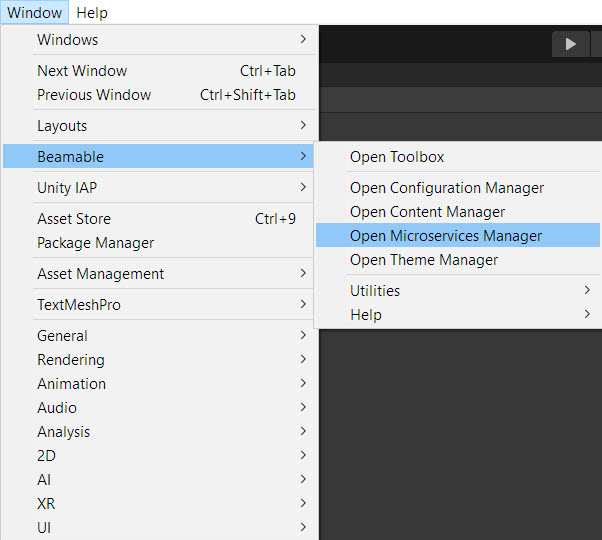 • Unity → Window → Beamable → Open Microservices Manager |
| 2. Create a new Microservice | • Unity → Window → Beamable → Create New Microservice • Populate all form fields |
| 3. Implement the Microservice method | See the BBBGameMicroservice.cs code snippet below the table |
| 4. Build the Microservice | 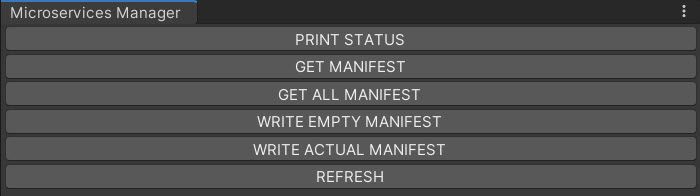 • See Beamable Microservice Manager Window |
| 5. Run the Microservice | • See Beamable Microservice Manager Window |
| 6. Play the Scene | • Unity → Edit → Play Note: Verify that the code properly functions. This varies depending on the specifics of the game logic |
| 7. Stop the Scene | • Unity → Edit → Stop |
API
Read these method diagrams along with the following code snippet for a full understanding of the client-server data exchange.
Call Microservice Method #1
The Boss data is passed along via ContentRef to set the initial BossHealth Stat value (say, 100). The heroWeaponIndexMax (for example, 2 if the hero owns two weapon items) is passed, and a random value is rolled to determine which weapon the Hero will use for the duration of the battle. This is stored in the HeroWeaponIndex Stat for subsequent use.
Note: The use of randomization for the HeroWeaponIndex is a simplified solution fit for this sample project. However, its likely a production game would feature deeper game play and allow the player to select the Hero's weapon, instead of using a random.
Call Microservice Method #2
A list of Weapon data is passed along via ContentRef. The Microservice uses only one index in the list (via HeroWeaponIndex Stat), calculates the damage done to the Boss and returns data to the client used for rendering of animations and UI text.
Code
Here is the code for the steps above.
Beamable auto-generates this original version of the BBBGameMicroservice as the starting point.
using Beamable.Server;

namespace Beamable.Server.BBBGameMicroservice
{
   [Microservice("BBBGameMicroservice")]
   public class BBBGameMicroservice : Microservice
   {
      [ClientCallable]
      public void ServerCall()
      {
         // This code executes on the server.
      }
   }
}
The game maker updates the code to meet the needs of the game project.
Here is final version of the BBBGameMicroservice.
BBBGameMicroservice.cs
namespace Beamable.Server.BBBGameMicroservice
{
   [Microservice("BBBGameMicroservice")]
   public class BBBGameMicroservice : Microservice
   {
      [ClientCallable]
      public async Task<StartTheBattleResults> StartTheBattle(BossContentRef bossContentRef, int heroWeaponIndexMax)
      {
         // Find the Boss data from the Boss content
         var boss = await bossContentRef.Resolve();

         // Set boss health to 100
         await BBBHelper.SetProtectedPlayerStat(Services, Context.UserId,
                BBBConstants.StatKeyBossHealth,
                boss.MaxHealth.ToString());

         // Set hero weapon index to random (0,1)
         int heroWeaponIndex = new System.Random().Next(heroWeaponIndexMax);

         await BBBHelper.SetProtectedPlayerStat(Services, Context.UserId,
                BBBConstants.StatKeyHeroWeaponIndex,
                heroWeaponIndex.ToString());

         return new StartTheBattleResults
         {
            BossHealthRemaining = boss.MaxHealth,
            HeroWeaponIndex = heroWeaponIndex
         };
      }

      [ClientCallable]
      public async Task<AttackTheBossResults> AttackTheBoss(List<WeaponContentRef> weaponContentRefs)
      {
         // Get the weapon index
         string heroWeaponIndexString = await BBBHelper.GetProtectedPlayerStat(Services, Context.UserId,
            BBBConstants.StatKeyHeroWeaponIndex);

         // Get the weapon
         int heroWeaponIndex = int.Parse(heroWeaponIndexString);

         // Find the weapon data from the Weapon content
         var weapon = await weaponContentRefs[heroWeaponIndex].Resolve();

         // Calculate the damage
         Random random = new Random();
         int damageAmount = 0;
         double hitRandom = random.NextDouble();

         //Console.WriteLine($"weaponData.hitChance={weapon.HitChance}.");
         //Console.WriteLine($"hitRandom={hitRandom}.");

         if (hitRandom <= weapon.HitChance)
         {
            damageAmount = random.Next(weapon.MinDamage, weapon.MaxDamage);
         }

         // Get the boss health
         string bossHealthString = await BBBHelper.GetProtectedPlayerStat(Services, Context.UserId,
            BBBConstants.StatKeyBossHealth);

         // Apply the damage
         int bossHealthRemaining = int.Parse(bossHealthString) - damageAmount;

         await BBBHelper.SetProtectedPlayerStat(Services, Context.UserId,
                BBBConstants.StatKeyBossHealth,
                bossHealthRemaining.ToString());

         return new AttackTheBossResults
         {
            DamageAmount = damageAmount,
            BossHealthRemaining = bossHealthRemaining
         };
      }
   }
}