Operations Blueprints
Operations and Blueprints
To improve Blueprint usability when working with Operations, the SDK provides a built-in way to manage dependencies between multiple operations. This approach removes the need for extra “wait” nodes and simplifies execution flow.
The wait node
The SDK provides a custom UK2Node Wait node that can wait on asynchronous operations, events, and similar workflows.
This node enables a clean and explicit pattern where: - You wait for an async operation to finish - Then continues the execution
While this works well in many scenarios, it became clear that most usages of the Wait node existed only to Operations before moving to the next step.
Operation dependency pins
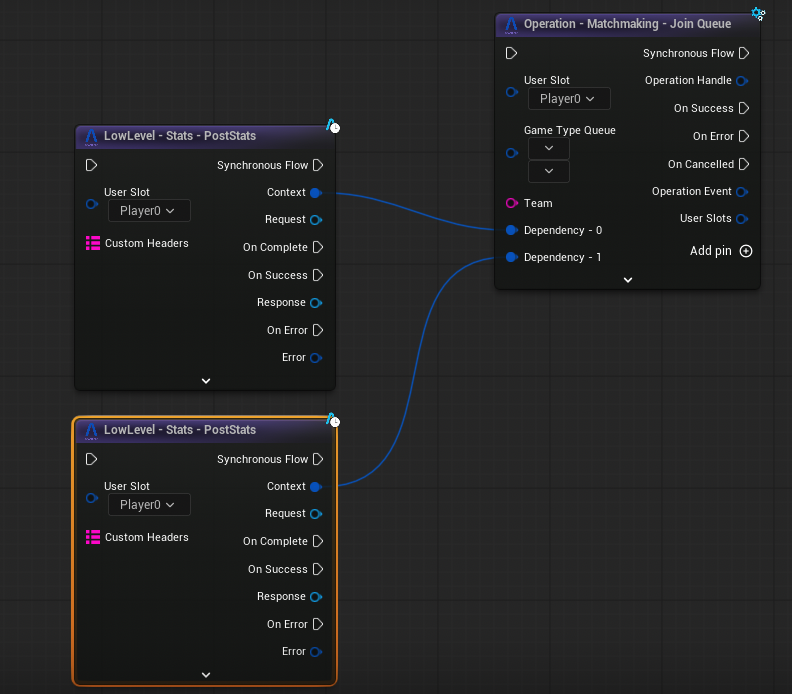
To solve this, each Operation Node now supports Dependency Pins via an Add Pin button.
Dependency pins allow an operation to explicitly depend on other operations without requiring a separate Wait node.
How it works
- Each dependency represents another operation that must complete successfully
- If any dependency fails, the current Operation fails immediately
- The failure is routed through the Operation’s Error output pin
Execution rules
- You can add any number of dependencies
- Dependencies are executed in parallel by default
- If you need sequential execution, chain operations by:
- Adding a dependency to an operation
- Then using that operation as a dependency for the next one, or depending on the case, connect the output pins directly
This gives you full control over execution order without additional nodes.
Example
Below is an example showing how dependency pins are used to control execution flow between operations: