Apple login integration (Unreal and Beamable)
This document describes how to integrate Apple / Game Center login in an Unreal Engine project and how Login and Attach federation flows work when linking Apple accounts to Beamable players.
Overview
Apple authentication is handled on the client using Unreal’s OnlineSubsystemIOS, while account linking and authentication are handled on the server using Beamable Federation.
High-level flow:
- Authenticate the player using Game Center
- Retrieve the Apple UserId
- Send the UserId to a Beamable Federation Microservice
- Beamable either logs the player in or attaches the Apple identity
Prerequisites
Unreal iOS setup
Follow Unreal’s official documentation to configure iOS builds:
Apple developer configuration
Enable the following capabilities in your Apple Developer project:
- Game Center
- Sign in with Apple
Apple documentation: https://developer.apple.com/documentation/gamekit/initializing-and-configuring-game-center
If these capabilities are not enabled, Apple authentication may silently fail on device.
Enabling OnlineSubsystemIOS
Apple login relies on Unreal’s OnlineSubsystemIOS plugin.
Enable it via Edit → Plugins or by copying it from the Engine plugins folder.
API reference: https://dev.epicgames.com/documentation/en-us/unreal-engine/API/PluginIndex/OnlineSubsystemIOS
Build.cs configuration
if (Target.Platform == UnrealTargetPlatform.IOS)
{
    DynamicallyLoadedModuleNames.Add("OnlineSubsystemIOS");
}
Apple login client implementation
The client authenticates with Game Center and retrieves a unique Apple UserId.
Responsibilities
- Trigger Game Center login
- Retrieve the Apple UserId
- Expose the result to Blueprint
Required functions
- Login
- GetUserId
Reference implementation: https://github.com/beamable/UnrealSDK/tree/main/Plugins/BEAMPROJ_BeamFarm/Source/BEAMPROJ_BeamFarm
Federation concept (Beamable)
Beamable Federation allows external identity providers to authenticate or link accounts.
For Apple integration:
- The Apple UserId is used as the federation token
- The token uniquely identifies the Apple user
- Beamable uses it to authenticate or attach the identity
Federation reference: user-reference/federation/federated-login
Apple federation Microservice
Federation identifier
Federated login implementation
async Promise<FederatedAuthenticationResponse>
    IFederatedLogin<GameCenterFederation>.Authenticate(
        string token,
        string _,
        string __)
{
    return new FederatedAuthenticationResponse()
    {
        user_id = token
    };
}
Login vs attach flows
Login flow (returning player)
Purpose: Authenticate a player who has already linked Apple.
Client:
- Game Center Login
- Retrieve Game Center UserId
- Call Federated Login
Server:
- Finds account linked to Apple UserId
- Logs player in
Result:
- Player authenticated
Attach flow (first-time link)
Purpose: Link Apple to an existing account.
Client:
- Apple Login
- Retrieve Apple UserId
- Call Attach – Federated Identity
Server:
- Links Apple UserId to current account
Result:
- Apple identity attached
- Progress preserved
Client Blueprint
- Trigger Apple Login
- Retrieve UserId
- Call Attach or Login
- Handle success or failure
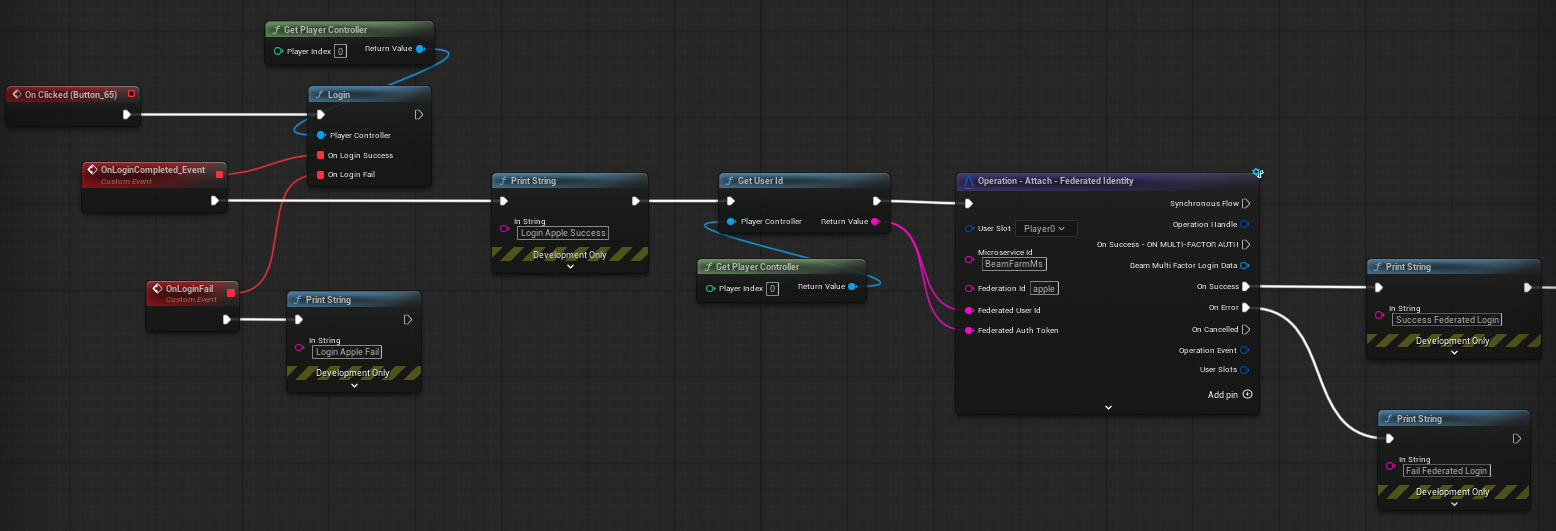
Required files for Game Center on iOS
Two additional files must be present in the project for Game Center to work correctly on iOS.
SSL certificate (cacert.pem)
Beamable uses secure socket connections on iOS, and the OS requires a trusted CA certificate bundle to validate them. Without this file, Beamable network calls will fail silently on device.
-
Locate the certificate file bundled with the engine:
-
Copy it into a folder named
Certificatesinside your project's Source folder:
Unreal will include this file in the iOS bundle, allowing Beamable to establish trusted connections at runtime.
Game Center entitlements (GameCenter.entitlements)
Unreal must be told about the entitlements file so it can embed the correct Apple capabilities (Game Center and Sign in with Apple) during the build and signing process.
In your project's iOS build settings, verify that the Additional Plist Data or equivalent entitlements path is pointing to a file named GameCenter.entitlements located at the root of the project:
This file must be referenced in the project settings so that Unreal includes it during code signing. Without it, Apple capabilities such as Game Center will not be active in the signed build, and authentication will fail.