Google sign-in integration (Unreal and Beamable)
This document describes how to integrate Google Sign-In in an Unreal Engine project and how Login and Attach federation flows work when linking Google accounts to Beamable players.
Overview
Google authentication is handled on the client using Google Sign-In, while account linking and authentication are handled on the server using Beamable Federation.
High-level flow:
- Authenticate the player using Google Sign-In
- Retrieve a Google ID Token
- Send the ID Token to a Beamable Federation Microservice
- Beamable validates the token with Google and:
- Logs the player in
- Or attaches the Google identity to an existing account
Prerequisites
Google developer console setup
Before implementing Google Sign-In, configure a Google Cloud project:
- Enable Google Identity Services
- Create an OAuth 2.0 Client ID
- Configure authorized bundle IDs / package names
Google documentation: https://developers.google.com/identity/sign-in
Google sign-in client implementation
The client authenticates the player with Google and retrieves an ID Token.
Responsibilities
- Trigger Google Sign-In flow
- Retrieve the ID Token
- Forward the token to Beamable
- Handle user cancellation or failure
Federation concept (Beamable)
Beamable Federation allows external identity providers (such as Google) to authenticate or link accounts.
For Google integration:
- The Google ID Token is sent to the federation
- The federation validates the token with Google
- The Google UID (
sub) becomes the authoritative user identifier
Google federation Microservice
Federated login implementation
async Promise<FederatedAuthenticationResponse>
    IFederatedLogin<GoogleFederation>.Authenticate(
        string token,
        string challenge,
        string solution)
{
    return new FederatedAuthenticationResponse()
    {
        user_id = await GetGoogleUidFromIdTokenAsync(token)
    };
}
Token validation
public async Task<string> GetGoogleUidFromIdTokenAsync(string idToken)
{
    HttpClient httpClient = new HttpClient();

    var payload = new FormUrlEncodedContent(new[]
    {
        new KeyValuePair<string, string>("id_token", idToken)
    });

    var response = await httpClient.PostAsync(
        "https://oauth2.googleapis.com/tokeninfo",
        payload);

    response.EnsureSuccessStatusCode();

    var content = await response.Content.ReadAsStringAsync();
    var json = JObject.Parse(content);

    return json["sub"]?.ToString();
}
Login vs attach flows
Login flow (returning player)
- Player selects Sign in with Google
- Client retrieves ID Token
- Calls Federated Login
- Backend validates token and logs player in
Attach flow (first-time link)
- Player is already authenticated
- Client retrieves ID Token
- Calls Attach – Federated Identity
- Backend links Google UID to account
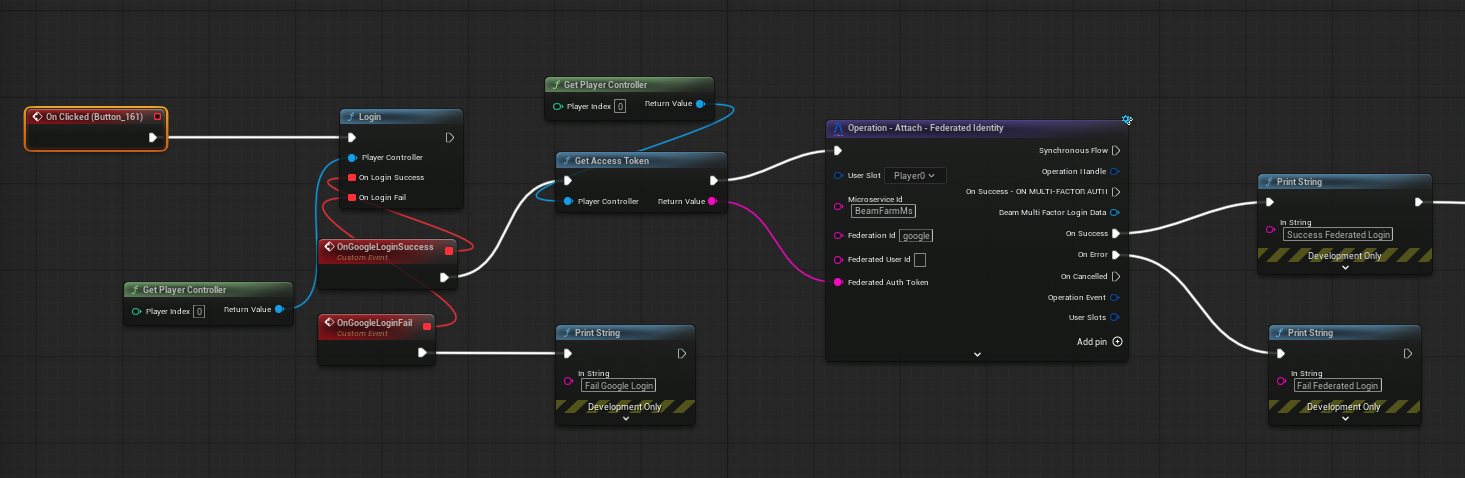
Client Blueprint
- Trigger Google Login
- Retrieves the ID Token
- Call Attach or Login
- Handle success or failure