Linux builds workflow
This guide will provide a way to get a working Linux build on Windows.
Building from Docker
While you can build a game using Docker, that approach proved suboptimal compared to the one described in this guide.
Cross compilation
Windows only
Cross-compiling in Unreal world is limited to Windows only. On Linux you can compile only Linux target, same for Mac users.
Cross-compilation requires:
1. Go to Unreal docs page that contains toolchains, download and install the Cross-Compile Toolchain that matches version of Unreal Engine you are using
2. Update environment variables by adding new variable LINUX_MULTIARCH_ROOT with value being the path to the newly installed toolchain. It should be something like F:\UnrealToolchains\v22_clang-16.0.6-centos7
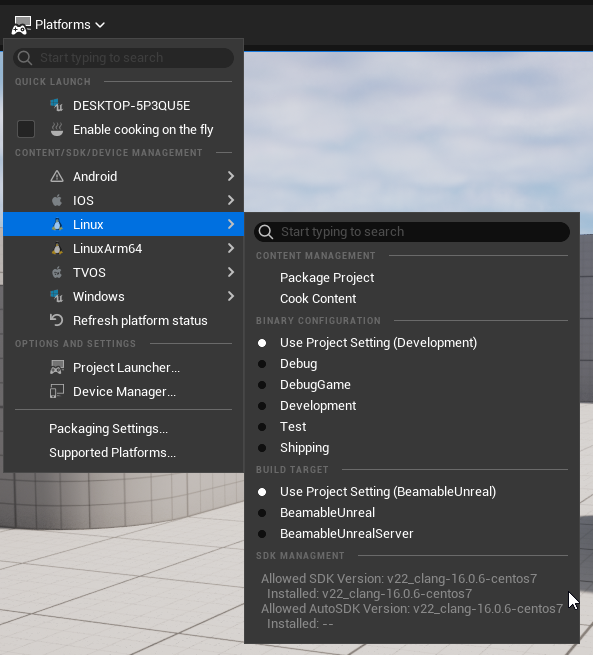
3. Now when the game is open in the editor it should be possible to build for the Linux Target platform:
Testing the build
To test Linux game builds, use a machine with Linux installed. For the server ones it is easy to test them on Windows machine in two different ways.
WSL
WSL is a feature of Windows for running a Linux environment on Windows machine, without Docker.
WSL
This part of tutorial is written with assumption that WSL is installed and operational.
- Build Linux Server target build of the game
- Open
Windows Subsystem for Linuxconsole inLinuxServerdirectory of the build- It should contain an
Enginefolder, aProjectNamefolder and a script file with filename in format:{ProjectName}Server.sh
- It should contain an
- Run the script file:
./{ProjectName}Server.sh - Server should be up and running
Docker
Docker is often used by Game Server Orchestrators for running built Game Servers. Beamable does provide a working example of that workflow in Beamball Demo.
Assumption
This part of tutorial is written with assumption that Docker is installed and operational.
- Build the game's Linux Server target
- Open
LinuxServerdirectory of the build- It should contain an
Enginefolder, aProjectNamefolder and a script file with filename in format:{ProjectName}Server.sh
- It should contain an
- Create
Dockerfilefile inLinuxServerdirectory - Copy the file contents below to the created
Dockerfile- Do not forget to update the paths to match your project!
FROM ubuntu:22.04

# Add these dependencies to enable your server to make outbound TLS requests
RUN apt-get update && \
    apt-get install -y ca-certificates && \
    update-ca-certificates

RUN groupadd --gid 1000 unreal \
  && useradd --uid 1000 --gid unreal --create-home unreal
USER unreal

# Copy the Unreal game server contents
WORKDIR /home/unreal
COPY --chown=unreal:unreal . .

RUN chmod +x {ProjectName}Server.sh
RUN chmod +x {ProjectName}/Binaries/Linux/{ProjectName}Server

# Expose the Unreal game server port
EXPOSE 7777/udp

# Start init script (passing any parameters you need)
ENTRYPOINT [ "./{ProjectName}Server.sh", "-custom_parameter=SOME_VALUE" ]
- Open command line in
LinuxServerdirectory and run this command:docker build -t my_server . - Run the server build:
docker run -t my_server