SDK technical overview
The Beamable SDK is a collection of custom UE Engine, Editor and GameInstance Subsystems.
If you are not familiar with Unreal Subsystems, see the Unreal Engine Programming Subsystems documentation.
Game-Maker Code (as in, code the Beamable customer writes) can take advantage of various guarantees the SDK provides by understanding how these subsystems work.
Plugin modules
The SDK's Plugin is divided into several modules:
- BeamableCore contains the
UEngineSubsystemimplementations shared betweenEditorandRuntimeexecuting environments. It also contains theUBeamContentObjectschema definitions for the content system - BeamableCoreRuntime contains the
UBeamRuntimeandUBeamRuntimeSubsystemimplementations and manages the SDK lifecycle at runtime (during PIE and in packaged clients) - BeamableCoreEditor and BeamableCoreRuntimeEditor contain
UBeamEditorand the editor integration code: custom BlueprintNodes, PropertyCustomizations, etc.
Core concepts
For any technical lead making system-level decisions, effective use of Beamable and the Beamable Unreal SDK requires you to understand a few core concepts. After reading this document, start here:
- Content: how you define your game's configuration — balancing data, currency and item definitions, etc. Most SDK systems depend on Content, so it is a good place to start
- Identity: the various ways you can manage a player's account and login flows
- Microservices: Beamable's version of cloud-code — but also much more
- Federation: extension points in Beamable backend services that delegate specific actions to your microservices, such as third-party authentication
Aside from those core concepts, the links below explain some of the higher-level systems.
- Stats and Inventory are the general-case player-data stores. These can be used to store player-related data and implement a variety of features
- Matchmaking, Lobbies, Friends and Parties are all part of the suite of services for real-time multiplayer games
- Stores, Leaderboards and Announcements are all part of the suite of services for live-ops meta-game engagement
Beamable runtime SDK
UBeamRuntime is the entry point for the Beamable SDK at runtime (PIE, packaged game clients, and dedicated servers). It is a GameInstanceSubsystem and follows its lifecycle rules. It is responsible for a couple of things:
- Controls the SDK's runtime initialization flow
- Controls the various SDK's user [un]-authentication flows
- Controls
UBeamRuntimeSubsystems'lifecycle with respect to the SDK's initialization flow itself andFUserSlotauthentication
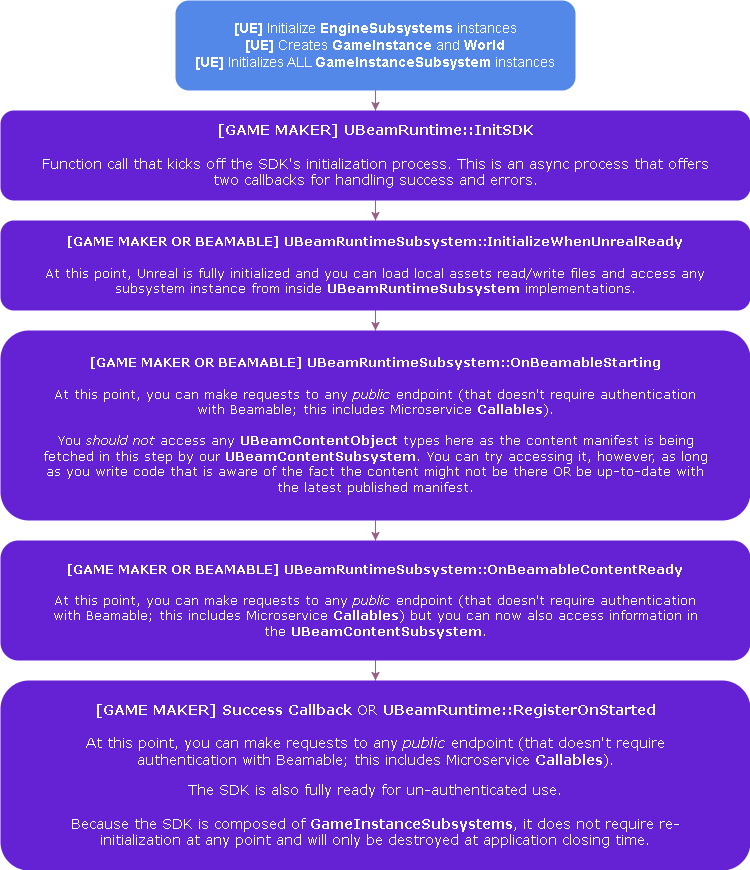
The image below describes how the SDK's lifecycle injects itself into UE's lifecycle:
The next image shows a high-level description of the authentication flows supported by the SDK:
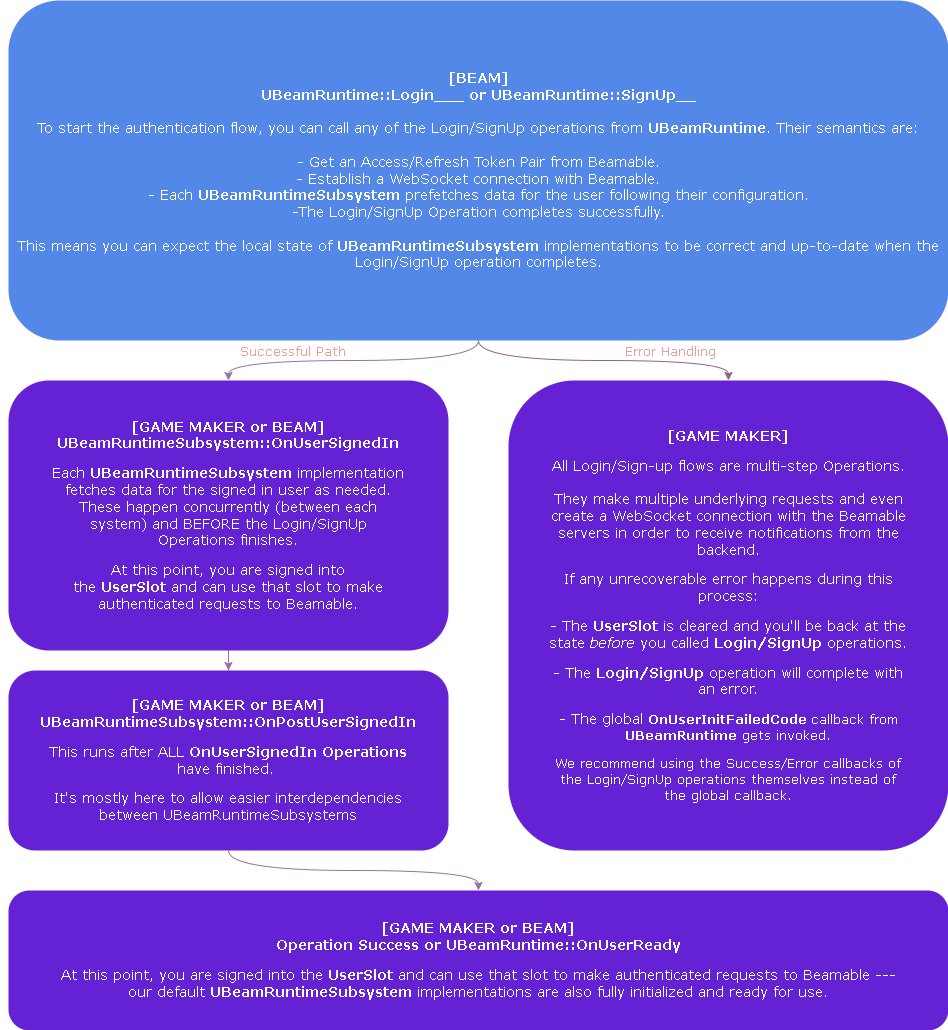
Every engineer working with Beamable should understand this lifecycle. It should enable them to make the best use and decisions when designing systems with or on top of Beamable.
Beamable runtime subsystems
BeamRuntimeSubsystems are stateful subsystems that aim to provide an extendable baseline of some Beamable functionality. They are built on top of the auto-generated lower-level API (UBeam____Api classes) to make it simpler to use the SDK's APIs so that:
- You do not have to set up the common case
- You can use them and their extension points for variations of the common case
- You can use them as reference implementations to implement your own custom use cases
These are handwritten and maintained by the Beamable SDK team. Here are a few examples:
UBeamStatsSubsystem: enables you to store arbitrary key-value pairs associated to a player's accountUBeamInventorySubsystem: provides builder functions around the Inventory APIs that allow you to combine what would be multiple API requests into a single batched inventory update. It also receives inventory notifications coming from the server and keeps in-memory player state in syncUBeamMatchmakingSubsystem: provides a stateful way of joining/canceling a matchmaking queue and receiving updates when a match is found
These systems make use of the various UBeamRuntimeSubsystem callbacks to keep their state correct and expose callbacks and configuration options for Game-Maker Code to run with semantically relevant guarantees. Coupled with Federations, these guarantees can greatly simplify client implementations and reduce their cost.
All Blueprint nodes, except the Low-Level ones, are backed by these subsystem implementations.
If the exposed hooks on these are not enough for your use case and constraints, you can create your own UBeamRuntimeSubsystem. The SDK does not obfuscate its inner-workings from you so you can use the existing UBeamRuntimeSubsystems as a reference to understand how to create your own. The documentation on Lower Level SDK and Operations & Waits can also be useful when implementing your own UBeamRuntimeSubsystems.
Advanced - disabling runtime subsystems
You can also opt out of these entirely by adding them to UBeamCoreSettings 's property: ManuallyInitializedRuntimeSubsystems. All subsystems in this list, and any other subsystem that depends on it, are not automatically initialized by the SDK. For example, if UBeamInventorySubsystem is in this list, this system will not be usable until you manually initialize it.
You can use the above to:
- Delay initialization of subsystems to a later point to reduce startup times
- Replace the SDK's default implementation of a system with your own, avoiding its overhead
- Disable systems that you do not want to use to reduce the SDK's request overhead
Keep in mind that the simplest way is to build your features on top of these subsystems instead of replacing them. However, there are complex cases where it may be easier to make your own system instead of these subsystems. This is why the SDK allows enabling and disabling systems at this granularity.
Advanced - beyond hooks and SDK modifications
The Beamable Unreal SDK ships with full source code so you can edit it when needed. The code is organized and commented to make modifications feasible, for a few reasons:
- Owning Dependencies: The Beamable UE team's philosophy is that dependencies should be managed explicitly and, whenever possible, committed to your VCS. Since the Beamable SDK is a significant dependency of your project, we want you to have as much control over it as possible
- Visibility: SDK internals are subject to change, so avoid depending on them directly — but having access to them can better inform design choices. You can use the details of
UBeamRuntimeSubsystemimplementations as guides when designing custom systems on top of Beamable - Debuggability: Having the SDK source lets you investigate it, find issues stemming from incorrect usage or SDK bugs, and report them to Beamable
The goal is to help you get a head start in development, but if the SDK's systems are not working for you, you are free to adjust or replace them.
Disclaimer
IF YOU MODIFY THE SDK, YOU ARE TAKING OWNERSHIP OF MAKING THAT MODIFICATION WORK WITH THE REST OF THE SDK.
Beamable Pro-Support can help you investigate, and future SDK versions may even ship a generalization of what you need based on that process — but there is no guarantee that any modification will work out of the box with itself or future versions of the SDK.
Still, sometimes this risk and cost can be worth it. Tech leads and senior engineers are best positioned to evaluate that trade-off and proceed when it makes sense for their project.